前段时间一个小工具使用往ClassLoader的DexPathList的Element数组前面插入热修复dex的方式实现了热加载外部代码。
但是偶然发现安卓会有预加载class的机制,在插入Element数组之前就已经把class预加载到ClassLoader,不会再加载外部dex的class。
在网上搜索了下发现Tinker在AndroidN上就遇到过,还输出了技术文档。总结下如果我修复这个问题可以用下面的方式:
- 直接导入Tinker
- 将热加载相关的代码抽离出一个最小dex,在启动的时候只加载这个dex其他类都通过这个dex里面的逻辑通过ClassLoader去动态加载
- 运行时直接替换ClassLoader为我们自定义的ClassLoader
由于Tinker有一定的接入成本,有很多我们不需要的功能和安卓版本的适配逻辑,最小dex的方式实现起来又比较复杂。加上我们并不是需要在线热更新,只是为了提升不可remount的量产软件的调试效率,所以选择了第三种方案。实际实现起来加上各种配置需求和注释总共也就300来行代码。
Application代码替换
替换ClassLoader的思想很简单,如果我的Application是由自定义ClassLoader加载的,那么它所用的的所有类也会由自定义ClassLoader加载。于是我们只需要定义一个包含Application各种可重写方法的ApplicationLike类替代原生的Application,然后在HotfixApplication使用自定义ClassLoader去加载调用它即可:
1
2
3
4
5
6
7
8
9
10
11
12
13
14
15
16
17
18
19
20
21
22
23
24
25
26
27
28
29
30
31
32
33
34
35
36
37
38
39
40
41
42
43
44
45
46
47
48
49
50
51
52
53
54
55
56
57
58
59
60
61
62
63
64
| public class ApplicationLike {
...
public void onCreate() {
}
public void attachBaseContext(Context base) {
}
public void onTerminate() {
}
public void onConfigurationChanged(Configuration newConfig) {
}
public void onLowMemory() {
}
public void onTrimMemory(int level) {
}
}
public class HotfixApplication extends Application {
private Object mApplicationLike = null;
@Override
protected void attachBaseContext(Context base) {
super.attachBaseContext(base);
mApplicationLike = loadFromHotfix();
invokeApplicationLike("attachBaseContext", new Class<?>[]{Context.class}, new Object[]{base});
}
@Override
public void onCreate() {
super.onCreate();
invokeApplicationLike("onCreate", new Class<?>[]{}, new Object[]{});
}
@Override
public void onTerminate() {
super.onTerminate();
invokeApplicationLike("onTerminate", new Class<?>[]{}, new Object[]{});
}
@Override
public void onConfigurationChanged(Configuration newConfig) {
super.onConfigurationChanged(newConfig);
invokeApplicationLike("onConfigurationChanged", new Class<?>[]{Configuration.class}, new Object[]{newConfig});
}
@Override
public void onLowMemory() {
super.onLowMemory();
invokeApplicationLike("onLowMemory", new Class<?>[]{}, new Object[]{});
}
@Override
public void onTrimMemory(int level) {
super.onTrimMemory(level);
invokeApplicationLike("onTrimMemory", new Class<?>[]{Integer.TYPE}, new Object[]{level});
}
...
}
|
四大组件代码替换
但是这样会有个问题,虽然ApplicationLike使用的是热更新的代码,但四大组件是由安卓用默认的ClassLoader去加载使用的原本的代码,这样就造成Application和四大组件的ClassLoader不一致出现各种意料之外的问题。所以我们需要将默认的ClassLoader也替换成我们的自定义ClassLoader。
我看了下Tinker的实现发现在我们的安卓13的平台上并没有生效,应该不止这里还有其他的地方需要配合。由于Tinker代码比较多暂时没有找到还有哪些地方需要配合修改,于是我正向从安卓源码去分析看可以在哪里hook替换。
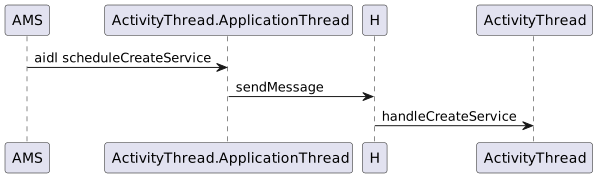
以Service为例子,当AMS需要启动应用的Service的时候都会通过aidl调用到应用进程的ActivityThread.ApplicationThread.scheduleCreateService,然后应用在里面通过handler同步到主线程去调用handleCreateService:
1
2
3
4
5
6
7
8
9
10
11
12
13
14
15
16
17
18
19
20
21
22
23
24
25
26
27
28
29
30
31
32
33
34
35
36
37
|
public final class ActivityThread extends ClientTransactionHandler
implements ActivityThreadInternal {
...
private class ApplicationThread extends IApplicationThread.Stub {
...
public final void scheduleCreateService(IBinder token,
ServiceInfo info, CompatibilityInfo compatInfo, int processState) {
updateProcessState(processState, false);
CreateServiceData s = new CreateServiceData();
s.token = token;
s.info = info;
s.compatInfo = compatInfo;
sendMessage(H.CREATE_SERVICE, s);
}
...
}
...
class H extends Handler {
...
public void handleMessage(Message msg) {
...
case CREATE_SERVICE:
if (Trace.isTagEnabled(Trace.TRACE_TAG_ACTIVITY_MANAGER)) {
Trace.traceBegin(Trace.TRACE_TAG_ACTIVITY_MANAGER,
("serviceCreate: " + String.valueOf(msg.obj)));
}
handleCreateService((CreateServiceData)msg.obj);
Trace.traceEnd(Trace.TRACE_TAG_ACTIVITY_MANAGER);
break;
...
}
...
}
...
}
|
handleCreateService内会在mPackages里面根据包名获取缓存的LoadedApk,然后使用getClassLoader获取ClassLoader去实例化Service:
1
2
3
4
5
6
7
8
9
10
11
12
13
14
15
16
17
18
19
20
21
22
23
24
25
26
27
28
29
30
31
32
33
34
35
36
37
38
39
40
41
42
43
44
45
46
47
48
| final ArrayMap<String, WeakReference<LoadedApk>> mPackages = new ArrayMap<>();
...
private void handleCreateService(CreateServiceData data) {
...
LoadedApk packageInfo = getPackageInfoNoCheck(
data.info.applicationInfo, data.compatInfo);
Service service = null;
...
final java.lang.ClassLoader cl;
if (data.info.splitName != null) {
cl = packageInfo.getSplitClassLoader(data.info.splitName);
} else {
cl = packageInfo.getClassLoader();
}
service = packageInfo.getAppFactory()
.instantiateService(cl, data.info.name, data.intent);
...
}
...
public final LoadedApk getPackageInfoNoCheck(ApplicationInfo ai,
CompatibilityInfo compatInfo) {
return getPackageInfo(ai, compatInfo, null, false, true, false);
}
...
private LoadedApk getPackageInfo(ApplicationInfo aInfo, CompatibilityInfo compatInfo,
ClassLoader baseLoader, boolean securityViolation, boolean includeCode,
boolean registerPackage) {
return getPackageInfo(aInfo, compatInfo, baseLoader, securityViolation, includeCode,
registerPackage, false);
}
...
private LoadedApk getPackageInfo(ApplicationInfo aInfo, CompatibilityInfo compatInfo,
ClassLoader baseLoader, boolean securityViolation, boolean includeCode,
boolean registerPackage, boolean isSdkSandbox) {
final boolean differentUser = (UserHandle.myUserId() != UserHandle.getUserId(aInfo.uid));
synchronized (mResourcesManager) {
WeakReference<LoadedApk> ref;
if (differentUser || isSdkSandbox) {
ref = null;
} else if (includeCode) {
ref = mPackages.get(aInfo.packageName);
} else {
ref = mResourcePackages.get(aInfo.packageName);
}
...
}
|
所以我们只需要hook替换掉自身包名的LoadedApk的ClassLoader即可,注意自定义ClassLoader的父ClassLoader不能设置成原ClassLoader,而应该设置成原ClassLoader的父ClassLoader,要不然自定义的ClassLoader不会生效:
1
2
3
4
5
6
7
8
9
10
11
12
13
14
15
16
17
18
19
20
21
22
| private static void loadHotfixClassLoader(Application context, File hotfixApk) {
...
sHotfixClassLoader = new PathClassLoader(
hotfixApk.getAbsolutePath(),
libraryPathBuilder.toString(),
ClassLoader.getSystemClassLoader());
Class<?> activityThreadClass = Class.forName("android.app.ActivityThread");
Field threadField = activityThreadClass.getDeclaredField("sCurrentActivityThread");
threadField.setAccessible(true);
Object sCurrentActivityThread = threadField.get(null);
Field packagesField = activityThreadClass.getDeclaredField("mPackages");
packagesField.setAccessible(true);
sLoadedApk = ((Map<String, WeakReference<LoadedApk>>) packagesField.get(sCurrentActivityThread))
.get(context.getPackageName())
.get();
Field classLoaderField = LoadedApk.class.getDeclaredField("mClassLoader");
classLoaderField.setAccessible(true);
classLoaderField.set(sLoadedApk, sHotfixClassLoader);
...
}
|
so库替换
创建自定义的PathClassLoader的时候需要将原本的so加载路径传给自定义的ClassLoader,要不然复用不了原本的so,当热修复目录没有so的时候报会找不到so的异常。然后我们将热修复目录插到so加载目录的最前面,优先从此处加载so:
1
2
3
4
5
6
7
8
9
10
11
12
13
14
15
16
17
18
19
20
21
22
23
24
25
26
27
28
29
30
31
32
33
34
35
36
37
38
39
40
41
42
43
44
| private static List<File> getOriginNativeLibraryDirectories() {
try {
ClassLoader oldClassLoader = HotfixUtils.class.getClassLoader();
final Field pathListField = findField(
Class.forName("dalvik.system.BaseDexClassLoader", false, oldClassLoader),
"pathList");
final Object oldPathList = pathListField.get(oldClassLoader);
final Field nativeLibraryDirectoriesField = findField(oldPathList.getClass(), "nativeLibraryDirectories");
return (List<File>) nativeLibraryDirectoriesField.get(oldPathList);
} catch (Throwable t) {
Log.e(Contract.TAG, "getOriginNativeLibraryDirectories failed", t);
return new ArrayList<>();
}
}
private static void loadHotfixClassLoader(Application context, File hotfixApk) {
try {
List<File> libDirs = getOriginNativeLibraryDirectories();
libDirs.add(0, hotfixApk.getParentFile());
final StringBuilder libraryPathBuilder = new StringBuilder();
boolean isFirstItem = true;
for (File libDir : libDirs) {
if (libDir == null) {
continue;
}
if (isFirstItem) {
isFirstItem = false;
} else {
libraryPathBuilder.append(File.pathSeparator);
}
libraryPathBuilder.append(libDir.getAbsolutePath());
}
sHotfixClassLoader = new PathClassLoader(
hotfixApk.getAbsolutePath(),
libraryPathBuilder.toString(),
ClassLoader.getSystemClassLoader());
...
} catch (Throwable t) {
Log.e(Contract.TAG, "loadHotfixClassLoader failed", t);
}
}
|
另外由于打开了seliunx的时候不允许system app从其他路径加载so,所以需要热更新so的时候需要用’setenforce 0’关闭selinux:
1
2
3
4
| 12-18 01:22:28.928 15724 15724 W binder:15724_3: type=1400 audit(0.0:47690): avc: denied { execute } for path="/data/data/me.linjw.demo.hotfix/cache/libnative.so" dev="dm-37" ino=66339 scontext=u:r:system_app:s0 tcontext=u:object_r:system_app_data_file:s0 tclass=file permissive=0
12-18 01:22:28.934 15724 15739 E AndroidRuntime: FATAL EXCEPTION: binder:15724_3
12-18 01:22:28.934 15724 15739 E AndroidRuntime: Process: me.linjw.demo.hotfix, PID: 15724
12-18 01:22:28.934 15724 15739 E AndroidRuntime: java.lang.UnsatisfiedLinkError: dlopen failed: couldn't map "/data/data/me.linjw.demo.hotfix/cache/libnative.so" segment 1: Permission denied
|
资源替换
我们可以使用AssetManager创建外部apk的Resources用于加载外部apk的资源:
1
2
3
4
5
6
7
8
9
10
11
12
13
14
15
| private static Resources loadHotfixResources(Context context, File hotfixApk) {
try {
Method method = AssetManager.class.getDeclaredMethod("addAssetPath", String.class);
AssetManager assetManager = AssetManager.class.newInstance();
method.invoke(assetManager, hotfixApk.getAbsolutePath());
return new Resources(
assetManager,
context.getResources().getDisplayMetrics(),
context.getResources().getConfiguration()
);
} catch (Throwable t) {
Log.e(Contract.TAG, "loadHotfixResources failed ", t);
}
return null;
}
|
插件化里面可能会直接使用这个Resources去获取资源,但是这里为了减少接入方的工作量,会考虑直接替换掉原本进程的Resources。这样一来不需要修改任何业务代码就能实现运行的时候加载的是外部apk的资源。
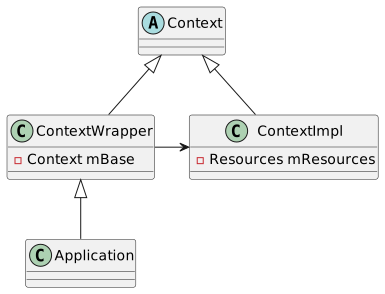
以Application为例子,它的资源最终都是从mBase这个ContextImpl的mResources获取的:
1
2
3
4
5
6
7
8
9
10
11
12
13
14
15
16
17
18
19
20
21
22
23
24
25
26
27
28
29
30
31
32
33
34
35
36
37
|
public abstract class Context {
...
public abstract Resources getResources();
...
public final String getString(@StringRes int resId) {
return getResources().getString(resId);
}
...
}
public class Application extends ContextWrapper implements ComponentCallbacks2 {
...
}
public class ContextWrapper extends Context {
@UnsupportedAppUsage
Context mBase;
...
public Resources getResources() {
return mBase.getResources();
}
...
}
class ContextImpl extends Context {
...
private @NonNull Resources mResources;
...
public Resources getResources() {
return mResources;
}
...
}
|
所以我们通过反射将HotfixResources替换给Application,就能实现在Application里面获取的资源都是外部包的资源:
1
2
3
4
5
6
7
8
9
10
11
12
13
14
15
16
| private static void replaceResource(Application context) {
if (sResources == null) {
return;
}
try {
Field fieldBase = ContextWrapper.class.getDeclaredField("mBase");
fieldBase.setAccessible(true);
Object base = fieldBase.get(context);
Field fieldResources = Class.forName("android.app.ContextImpl").getDeclaredField("mResources");
fieldResources.setAccessible(true);
fieldResources.set(base, sResources);
} catch (Throwable t) {
Log.e(Contract.TAG, "replaceResource failed", t);
}
}
|
四大组件也是类似的hook创建流程替换Resources,这里就不详细讲解了。