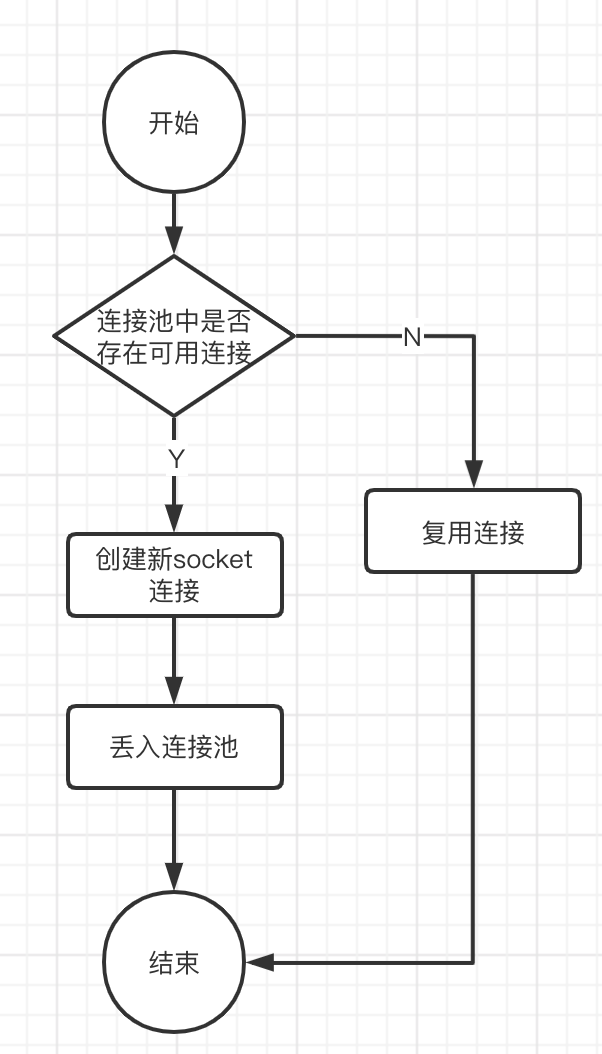
蛮久之前写过一篇博客OkHttp源码解析 ,相信大多数同学也看过或者了解过OkHttp的整体架构使用的是基于责任链模式的拦截器链。
其实这个库的其他设计也是蛮有意思的,这篇笔记我们就来看看它的Http连接是怎么实现的。
这部分的代码我们从ConnectInterceptor这个拦截器看起,它主要就是负责http的连接。新版本的OkHttp已经用kotlin重写了,所以下面的代码都是kotlin的:
1
2
3
4
5
6
7
8
9
10
11
12
13
14
15
16
17
18
19
object ConnectInterceptor : Interceptor { @Throws(IOException::class) override fun intercept (chain: Interceptor .Chain ) val realChain = chain as RealInterceptorChain val exchange = realChain.call.initExchange(chain) val connectedChain = realChain.copy(exchange = exchange) return connectedChain.proceed(realChain.request) } } class RealCall (...) : Call { internal fun initExchange (chain: RealInterceptorChain ) ... val codec = exchangeFinder.find(client, chain) val result = Exchange(this , eventListener, exchangeFinder, codec) ... return result } }
ConnectInterceptor的代码很简单,主要的功能就是初始化RealCall的Exchange。这个Exchange的功能就是基于http的Connection进行数据交换。
Connect缓存 在代码里面我们可以看到这个Exchange的codec是find出来的,codec的功能就算http报文的编解码。一般来讲用find的话就意味着它可能存在缓存:
1
2
3
4
5
6
7
8
9
10
11
12
13
14
15
16
17
18
19
20
21
22
23
24
25
26
27
28
29
30
31
32
33
34
35
36
37
38
39
40
41
42
43
44
45
46
47
48
49
50
51
52
class ExchangeFinder ( private val connectionPool: RealConnectionPool, internal val address: Address, private val call: RealCall, private val eventListener: EventListener ) { ... fun find (client: OkHttpClient , chain: RealInterceptorChain ) ... val resultConnection = findHealthyConnection(...) return resultConnection.newCodec(client, chain) ... } private fun findHealthyConnection (...) ... val candidate = findConnection(...) ... } private fun findConnection (...) ... if (connectionPool.callAcquirePooledConnection(address, call, null , false )) { val result = call.connection!! eventListener.connectionAcquired(call, result) return result } ... val newConnection = RealConnection(connectionPool, route) ... newConnection.connect(...) ... connectionPool.put(newConnection) call.acquireConnectionNoEvents(newConnection) ... return newConnection } ... } class RealCall (...) : Call { fun acquireConnectionNoEvents (connection: RealConnection ) ... this .connection = connection connection.calls.add(CallReference(this , callStackTrace)) } }
从上面的代码我们可以看出来,实际上并不是codec有缓存,而是http的Connection有缓存。codec是通过这个缓存的Connection创建出来的。
Connection实际上就维护着一条socket连接,我们可以看newConnection.connect的具体实现:
1
2
3
4
5
6
7
8
9
10
11
12
13
14
15
16
17
18
fun connect (...) ... connectSocket(connectTimeout, readTimeout, call, eventListener) ... } private fun connectSocket (...) val proxy = route.proxy val address = route.address val rawSocket = when (proxy.type()) { Proxy.Type.DIRECT, Proxy.Type.HTTP -> address.socketFactory.createSocket()!! else -> Socket(proxy) } ... Platform.get ().connectSocket(rawSocket, route.socketAddress, connectTimeout) ... }
也就是并不是每次请求都会创建一条新的socket连接:
请求计数 HTTP/1.0中,每次http请求都要创建一个tcp连接,而tcp连接的创建会消耗时间和资源(需要三次握手)。HTTP/1.1中引入了重用连接的机制,就是在http请求头中加入Connection: keep-alive来告诉对方这个请求响应完成后不要关闭,下次请求可以继续使用这条链接。
HTTP 1.X中一条连接同时只能进行一次请求,也就是说必须一个将上次Request的Response完全读取之后才能发送下一次Request,而HTTP 2中添加了链路复用的机制同时可以发送多个Request。
于是这里就存在了请求计数和请求数量计算的问题,那么OkHttp是如何实现的呢?
前面章节中创建或者复用Connect的时候都会调用到RealCall.acquireConnectionNoEvents,将RealCall的弱引用丢到connection.calls里面,于是就完成了请求的计数:
1
2
3
4
5
6
7
8
9
class RealCall (...) : Call { fun acquireConnectionNoEvents (connection: RealConnection ) ... this .connection = connection connection.calls.add(CallReference(this , callStackTrace)) } } internal class CallReference (...) : WeakReference<RealCall>(referent)
有add就有remove,正如我们上面所说,一次请求实际上就是发送一个Request并将它的Response完全读取。我们用Response.string举例,它最终是通过Exchange使用socket从服务端读取的数据:
1
2
3
4
5
6
7
8
9
10
11
12
13
14
15
16
17
18
19
20
21
22
23
24
25
abstract class ResponseBody : Closeable { @Throws(IOException::class) fun string () source.readString(charset = source.readBomAsCharset(charset())) } } class Exchange (...) { override fun read (sink: Buffer , byteCount: Long ) Long { ... val read = delegate.read(sink, byteCount) ... if (read == -1L ) { complete(null ) return -1L } val newBytesReceived = bytesReceived + read ... if (newBytesReceived == contentLength) { complete(null ) } return read ... } }
中间的过程过于曲折我就不一步步跟踪了,大家只要知道最终会调到Exchange.read方法。里面有两种情况读取到-1代表与服务器已经断开连接,读取的长度等于Response header里面的Content-Length字段,代表本次Response的全部数据已经读取完成。
这两者都代表这这次请求已经完成,会调用complete方法,最终调到RealCall.releaseConnectionNoEvents将它从connection.calls里面删掉:
1
2
3
4
5
6
7
8
9
10
11
12
13
14
15
16
17
18
19
20
21
22
23
24
25
26
27
28
29
30
31
32
33
34
35
36
37
38
39
class Exchange (...) { ... fun <E : IOException?> complete (e: E ) ... return bodyComplete(bytesReceived, responseDone = true , requestDone = false , e = e) } ... fun <E : IOException?> bodyComplete (...) ... return call.messageDone(this , requestDone, responseDone, e) } ... } class RealCall (...) : Call { ... internal fun <E : IOException?> messageDone (...) return callDone(e) } ... private fun <E : IOException?> callDone (e: E ) releaseConnectionNoEvents() } ... internal fun releaseConnectionNoEvents () ... val calls = connection.calls val index = calls.indexOfFirst { it.get () == this @RealCall } ... calls.removeAt(index) ... if (calls.isEmpty()) { connection.idleAtNs = System.nanoTime() ... } ... } ... }
这里就涉及到两个使用OkHttp容易不小心出现的错误:
Response.string只能调用一次
Response必须被读取
由于Response.string读取完成之后这次请求其实就已经结束了,而且OkHttp并没有对这个结果做缓存,所以下次再读取就会出现java.lang.IllegalStateException: closed异常。
而我们从上面的流程知道,connection.calls的remove要Response读取完成后执行,如果我们得到一个Response之后一直不去读取的话实际上它会一直占中这这个Connect,下次HTTP 1.X的请求就不能复用这套链接,要新建一条Connect。
请求限制 通过connection.calls我们能知道当前有多少个请求在占用这条connection,所以在连接池里面就能对次数进行限制。
从前面篇幅我们知道ExchangeFinder是通过RealConnectionPool.callAcquirePooledConnection从连接缓存池查找的Connection:
1
2
3
4
5
6
7
8
9
10
11
fun callAcquirePooledConnection (...) Boolean { for (connection in connections) { synchronized(connection) { if (requireMultiplexed && !connection.isMultiplexed) return @synchronized if (!connection.isEligible(address, routes)) return @synchronized call.acquireConnectionNoEvents(connection) return true } } return false }
connection.isEligible里面除了判断address是否相等之外还会判断请求数量是否已满:
1
2
3
4
5
6
7
8
9
10
11
12
13
14
internal fun isEligible (address: Address , routes: List <Route >?) Boolean { ... if (calls.size >= allocationLimit || noNewExchanges) return false if (!this .route.address.equalsNonHost(address)) return false if (address.url.host == this .route().address.url.host) { return true } ... }
allocationLimit在HTTP 1.X的情况下allocationLimit总是为1就保证了HTTP 1.X的情况下每次只能跑一个请求。
连接的断开 从上面的流从我们看到,连接在请求完成之后是不会断开的,等待下次请求复用。如果一直不去断开的话,就会有一个资源占用的问题。那么OkHttp是在什么时候断开连接的呢?
其实RealConnectionPool内部会有个cleanupTask专门用于连接的清理
1
2
3
private val cleanupTask = object : Task("$okHttpName ConnectionPool" ) { override fun runOnce () }
它会在RealConnectionPool的put(加入新连接)、connectionBecameIdle(有连接空闲)里面被调用:
1
2
3
4
5
6
7
8
9
10
11
12
13
14
15
16
17
18
19
20
fun put (connection: RealConnection ) connection.assertThreadHoldsLock() connections.add(connection) cleanupQueue.schedule(cleanupTask) } fun connectionBecameIdle (connection: RealConnection ) Boolean { connection.assertThreadHoldsLock() return if (connection.noNewExchanges || maxIdleConnections == 0 ) { connection.noNewExchanges = true connections.remove(connection) if (connections.isEmpty()) cleanupQueue.cancelAll() true } else { cleanupQueue.schedule(cleanupTask) false } }
cleanupQueue会根据Task.runOnce的返回值等待一段时间再次调用runOnce:
1
2
3
4
5
6
abstract class Task (...) { ... abstract fun runOnce () Long ... }
这里的runOnce实际就是cleanup方法,我们看看里面干了啥:
1
2
3
4
5
6
7
8
9
10
11
12
13
14
15
16
17
18
19
20
21
22
23
24
25
26
27
28
29
30
31
32
33
34
35
36
37
38
39
40
41
42
43
44
45
46
47
48
49
50
51
52
53
54
55
56
57
fun cleanup (now: Long ) Long { var inUseConnectionCount = 0 var idleConnectionCount = 0 var longestIdleConnection: RealConnection? = null var longestIdleDurationNs = Long .MIN_VALUE for (connection in connections) { synchronized(connection) { if (pruneAndGetAllocationCount(connection, now) > 0 ) { inUseConnectionCount++ } else { idleConnectionCount++ val idleDurationNs = now - connection.idleAtNs if (idleDurationNs > longestIdleDurationNs) { longestIdleDurationNs = idleDurationNs longestIdleConnection = connection } else { Unit } } } } when { longestIdleDurationNs >= this .keepAliveDurationNs || idleConnectionCount > this .maxIdleConnections -> { val connection = longestIdleConnection!! ... connection.socket().closeQuietly() if (connections.isEmpty()) cleanupQueue.cancelAll() return 0L } idleConnectionCount > 0 -> { return keepAliveDurationNs - longestIdleDurationNs } inUseConnectionCount > 0 -> { return keepAliveDurationNs } else -> { return -1 } } }
也就是说这里面会查找空闲过久的连接,然后关闭它的socket。然后计算下一次进行cleanup的等待时长。
pruneAndGetAllocationCount返回的是正在占用的请求数,用于检测连接是否空闲。但是其实它内部还会去回收泄露的Response:
1
2
3
4
5
6
7
8
9
10
11
12
13
14
15
16
17
18
19
20
21
22
23
24
25
26
27
28
29
30
31
private fun pruneAndGetAllocationCount (connection: RealConnection , now: Long ) Int { connection.assertThreadHoldsLock() val references = connection.calls var i = 0 while (i < references.size) { val reference = references[i] if (reference.get () != null ) { i++ continue } val callReference = reference as CallReference val message = "A connection to ${connection.route().address.url} was leaked. " + "Did you forget to close a response body?" Platform.get ().logCloseableLeak(message, callReference.callStackTrace) references.removeAt(i) connection.noNewExchanges = true if (references.isEmpty()) { connection.idleAtNs = now - keepAliveDurationNs return 0 } } return references.size }
这里的”A connection to ${connection.route().address.url} was leaked. Did you forget to close a response body?”指定就是前面请求计数那里讲的容易出现问题的第二点:得到一个Response之后一直不去读取的话实际上它会一直占中这这个Connect,具体可能是下面的样子:
1
2
3
4
5
6
7
8
9
10
client.newCall(getRequest()).enqueue(new Callback() { @Override public void onFailure(@NotNull Call call, @NotNull IOException e) { } @Override public void onResponse(@NotNull Call call, @NotNull Response response) throws IOException { } });
onResponse传入的response没有人去读取数据,就会一直占用连接,但是由于它在后面又没有人引用就会被GC回收导致这条连接再也不能断开。
pruneAndGetAllocationCount里面就通过弱引用get返回null的方式去检查到这样的异常,进行清理动作。
低版本的清理流程 上面讲的是最新版本的清理流程,低版本的流程稍微有点差异但是原理大致相同:
1
2
3
4
5
6
7
8
9
10
11
12
13
14
15
16
17
18
private final Runnable cleanupRunnable = new Runnable () { @Override public void run () { while (true ) { long waitNanos = cleanup(System.nanoTime()); if (waitNanos == -1 ) return ; if (waitNanos > 0 ) { long waitMillis = waitNanos / 1000000L ; waitNanos -= (waitMillis * 1000000L ); synchronized (ConnectionPool.this ) { try { ConnectionPool.this .wait(waitMillis, (int ) waitNanos); } catch (InterruptedException ignored) { } } } } } };
会专门为连接的清理开一条线程用while true的方式不断检查,当然类似的会使用wait方法等待cleanup返回的时间,减少cpu占用。