这篇文章让我们一起来复习一下aidl
aidl的简单用法 aidl的用法是很简单的。首先创建IDemoAidlInterface.aidl文件(在服务端工程和客户端工程中需要分别定义一个相同的aidl文件):
1
2
3
4
5
package linjw.demo.aidldemo; interface IDemoAidlInterface { int add(int a, int b); }
然后在service.onBind()中创建一个IDemoAidlInterface.Stub返回:
1
2
3
4
5
6
7
8
9
10
11
12
public class DemoService extends Service { @Nullable @Override public IBinder onBind(Intent intent) { return new IDemoAidlInterface.Stub() { @Override public int add(int a, int b) throws RemoteException { return a + b; } }; } }
这样在bindService的时候就能获得一个IDemoAidlInterface,就可以通过它去调用其他进程中的方法获取数据了:
1
2
3
4
5
6
7
8
9
10
11
12
13
14
15
16
17
18
19
20
21
22
23
24
25
26
27
28
29
30
31
32
33
public class MainActivity extends AppCompatActivity { public static final String TAG = "AIDLDemo"; private ServiceConnection mConnection = new ServiceConnection() { @Override public void onServiceConnected(ComponentName name, IBinder service) { IDemoAidlInterface aidl = IDemoAidlInterface.Stub.asInterface(service); try { Log.d(TAG, "1 + 2 = " + aidl.add(1, 2)); } catch (RemoteException e) { e.printStackTrace(); } } @Override public void onServiceDisconnected(ComponentName name) { } }; @Override protected void onCreate(Bundle savedInstanceState) { super.onCreate(savedInstanceState); setContentView(R.layout.activity_main); Intent intent = new Intent(this, DemoService.class); bindService(intent, mConnection, BIND_AUTO_CREATE); } @Override protected void onDestroy() { super.onDestroy(); unbindService(mConnection); } }
aidl的原理 但是aidl文件又是个什么东西?aidl又到底是怎样工作的呢?
aidl是Android Interface definition language的缩写,实际上它是一中领域特定语言即domain-specific languages,简称DSL,aidl的作用领域是定义安卓接口。感兴趣的同学可以自己去找一下DSL的相关概念,这里就不展开讨论了。
aidl底层是通过binder机制实现的,而且不同需求的binder通信实际上代码是有很大的相似性的。厉害的程序员通常是懒惰的程序员,好的ide通常也会提供各种强大的功能帮助程序员去偷懒。
aidl就是一种帮助我们简化安卓进程间通信代码的工具。android studio会根据aidl定义的接口,帮我们自动生成安卓进程间通信的代码,而我们只需要直接使用它生成的代码就好了,而不用自己去写。
让我们看看aidl究竟帮我们生成了什么样的代码:
1
2
3
4
5
6
7
8
9
10
11
12
13
14
15
16
17
18
19
20
21
22
23
24
25
26
27
28
29
30
31
32
33
34
35
36
37
38
39
40
41
42
43
44
45
46
47
48
49
50
51
52
53
54
55
56
57
58
59
60
61
62
63
64
65
66
67
68
69
70
71
72
73
74
75
76
77
78
79
80
81
82
83
84
85
86
87
88
89
90
91
92
93
94
95
96
97
public interface IDemoAidlInterface extends android.os.IInterface { /** * Local-side IPC implementation stub class. */ public static abstract class Stub extends android.os.Binder implements linjw.demo.aidldemo.IDemoAidlInterface { private static final java.lang.String DESCRIPTOR = "linjw.demo.aidldemo.IDemoAidlInterface"; /** * Construct the stub at attach it to the interface. */ public Stub() { this.attachInterface(this, DESCRIPTOR); } /** * Cast an IBinder object into an linjw.demo.aidldemo.IDemoAidlInterface interface, * generating a proxy if needed. */ public static linjw.demo.aidldemo.IDemoAidlInterface asInterface(android.os.IBinder obj) { if ((obj == null)) { return null; } android.os.IInterface iin = obj.queryLocalInterface(DESCRIPTOR); if (((iin != null) && (iin instanceof linjw.demo.aidldemo.IDemoAidlInterface))) { return ((linjw.demo.aidldemo.IDemoAidlInterface) iin); } return new linjw.demo.aidldemo.IDemoAidlInterface.Stub.Proxy(obj); } @Override public android.os.IBinder asBinder() { return this; } @Override public boolean onTransact(int code, android.os.Parcel data, android.os.Parcel reply, int flags) throws android.os.RemoteException { switch (code) { case INTERFACE_TRANSACTION: { reply.writeString(DESCRIPTOR); return true; } case TRANSACTION_add: { data.enforceInterface(DESCRIPTOR); int _arg0; _arg0 = data.readInt(); int _arg1; _arg1 = data.readInt(); int _result = this.add(_arg0, _arg1); reply.writeNoException(); reply.writeInt(_result); return true; } } return super.onTransact(code, data, reply, flags); } private static class Proxy implements linjw.demo.aidldemo.IDemoAidlInterface { private android.os.IBinder mRemote; Proxy(android.os.IBinder remote) { mRemote = remote; } @Override public android.os.IBinder asBinder() { return mRemote; } public java.lang.String getInterfaceDescriptor() { return DESCRIPTOR; } @Override public int add(int a, int b) throws android.os.RemoteException { android.os.Parcel _data = android.os.Parcel.obtain(); android.os.Parcel _reply = android.os.Parcel.obtain(); int _result; try { _data.writeInterfaceToken(DESCRIPTOR); _data.writeInt(a); _data.writeInt(b); mRemote.transact(Stub.TRANSACTION_add, _data, _reply, 0); _reply.readException(); _result = _reply.readInt(); } finally { _reply.recycle(); _data.recycle(); } return _result; } } static final int TRANSACTION_add = (android.os.IBinder.FIRST_CALL_TRANSACTION + 0); } public int add(int a, int b) throws android.os.RemoteException; }
它帮忙我们生成了我们在aidl中定义的IDemoAidlInterface接口,并且生成了一个抽象内部类IDemoAidlInterface.Stub去实现和安卓进程间通信相关的代码。而我们只需要继承IDemoAidlInterface.Stub实现具体的业务代码(add方法)就好:
1
2
3
4
5
6
7
8
9
public interface IDemoAidlInterface extends android.os.IInterface { public static abstract class Stub extends android.os.Binder implements linjw.demo.aidldemo.IDemoAidlInterface { ... } public int add(int a, int b) throws android.os.RemoteException; }
服务端通信原理 在服务端,我们只需要继承IDemoAidlInterface.Stub并完成add方法的功能代码就可以了。当客户端通过aidl调用服务端代码的时候,服务端的add方法就会被调用:
1
2
3
4
5
6
7
8
public IBinder onBind(Intent intent) { return new IDemoAidlInterface.Stub() { @Override public int add(int a, int b) throws RemoteException { return a + b; } }; }
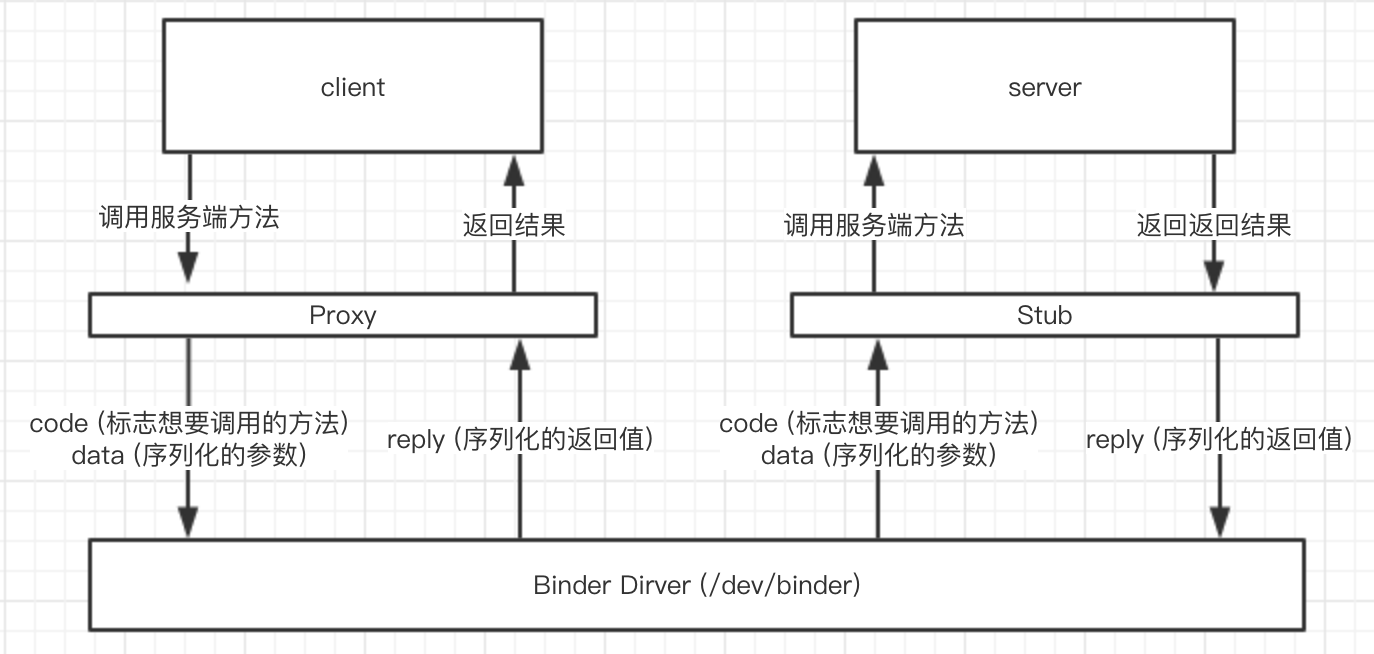
但是add究竟是为什么会被调用的呢?奥秘就在IDemoAidlInterface.Stub.onTransact()方法中。onTransact是android.os.Binder的一个方法。客户端将想要调用的服务端的方法、参数等序列化之后通过系统级别的Binder驱动程序传给服务端,然后服务端在将它们反序列化获取想要调用的方法还有传入的参数。而onTransact就是这个反序列化的方法:
1
2
3
4
5
6
7
8
9
10
11
12
13
14
15
16
17
18
19
20
public boolean onTransact(int code, android.os.Parcel data, android.os.Parcel reply, int flags) throws android.os.RemoteException { switch (code) { case INTERFACE_TRANSACTION: { reply.writeString(DESCRIPTOR); return true; } case TRANSACTION_add: { data.enforceInterface(DESCRIPTOR); int _arg0; _arg0 = data.readInt(); int _arg1; _arg1 = data.readInt(); int _result = this.add(_arg0, _arg1); reply.writeNoException(); reply.writeInt(_result); return true; } } return super.onTransact(code, data, reply, flags); }
code就代表了客户端想要执行的操作,当它是TRANSACTION_add的时候就代表客户端想调用服务端的add方法。可以从传过来的Parcel中反序列化出传入的两个相加数,然后调用实际的add方法,即this.add(_arg0, _arg1),最后将计算出来的值写入reply中序列化之后传回给客户端。客户端就可以从这个reply中反序列化中出计算的结果。
TRANSACTION_add是一个int,是IDemoAidlInterface接口定义的第一个方法:
1 static final int TRANSACTION_add = (android.os.IBinder.FIRST_CALL_TRANSACTION + 0);
客户端原理 客户端的代码比服务端会复杂一点点。首先从IDemoAidlInterface.Stub.asInterface方法开始看,我们可以通过它获取到一个IDemoAidlInterface:
1 IDemoAidlInterface aidl = IDemoAidlInterface.Stub.asInterface(service);
它的代码是这样的:
1
2
3
4
5
6
7
8
9
10
public static linjw.demo.aidldemo.IDemoAidlInterface asInterface(android.os.IBinder obj) { if ((obj == null)) { return null; } android.os.IInterface iin = obj.queryLocalInterface(DESCRIPTOR); if (((iin != null) && (iin instanceof linjw.demo.aidldemo.IDemoAidlInterface))) { return ((linjw.demo.aidldemo.IDemoAidlInterface) iin); } return new linjw.demo.aidldemo.IDemoAidlInterface.Stub.Proxy(obj); }
它会判断传进来的IBinder是不是IDemoAidlInterface的一个实例,如果是的话就直接将它返回,不是的会就会用它去创建一个代理。
但这个判断有什么用呢?什么时候IBinder它会是一个IDemoAidlInterface的实例什么时候又不是呢?
我们写的service不外乎给其他应用使用和给应用内部使用。给其他应用使用的service因为进程不同不能直接传递对象,所以需要将一个对象先序列化再反序列化去实现进程间的传递。但是有一些服务比如播放器的播放服务,很多时候就只是应用内部在使用而已,是进程内的通信(或者说只是线程间的通信)。其实不涉及跨进程通信,可以直接传递,不用经过序列化和反序列化这样耗时的操作。
如果是进程内的通信,传入的IBinder其实是IDemoAidlInterface的一个实例,所以直接返回将它返回就好。但如果是进程间的通信,就不会是是IDemoAidlInterface的实例了,而是一个用于进程间通信的对象了(具体是什么我们可以不用关心)。这个对象没有实现IDemoAidlInterface.add()方法,所以需要通过一些特殊的手段调用到服务端的add方法:
1
2
3
4
5
6
7
8
9
10
11
12
13
14
15
16
17
18
19
20
21
22
23
24
25
26
27
28
29
30
31
32
33
34
35
36
37
38
private static class Proxy implements linjw.demo.aidldemo.IDemoAidlInterface { private android.os.IBinder mRemote; Proxy(android.os.IBinder remote) { mRemote = remote; } @Override public android.os.IBinder asBinder() { return mRemote; } public java.lang.String getInterfaceDescriptor() { return DESCRIPTOR; } @Override public int add(int a, int b) throws android.os.RemoteException { android.os.Parcel _data = android.os.Parcel.obtain(); android.os.Parcel _reply = android.os.Parcel.obtain(); int _result; try { _data.writeInterfaceToken(DESCRIPTOR); _data.writeInt(a); _data.writeInt(b); mRemote.transact(Stub.TRANSACTION_add, _data, _reply, 0); _reply.readException(); _result = _reply.readInt(); } finally { _reply.recycle(); _data.recycle(); } return _result; } } static final int TRANSACTION_add = (android.os.IBinder.FIRST_CALL_TRANSACTION + 0); }
它最重要的代码是IDemoAidlInterface.Stub.Proxy.add()这个方法。它将传入的a、b参数序列化到_data这个Parcel中,然后再通过之前传入的IBinder的transact()将它们传递到service中。注意看,我们还指定了调用Stub.TRANSACTION_add这个方法。上一节服务端获取到的code就是这里指定的。然后服务端将计算到的结果序列化到_reply中,客户的这里再将_reply反序列化得到计算结果返回。
aidl原理图 aidl的原理可以用下面的图来表示:
使用aidl传递复杂数据类型 有时候我需要传递一些复杂的数据类型比如自定义的类,aidl也是支持的。但是因为aidl传递数据都是通过序列化实现的,所以aidl要求传递的类必须实现Parcelable接口。比如我们定义一个Data类:
1
2
3
4
5
6
7
8
9
10
11
12
13
14
15
16
17
18
19
20
21
22
23
24
25
26
27
28
29
30
31
32
33
34
35
36
37
38
39
public class Data implements Parcelable { public String data; public Data() { } public Data(String data) { this.data = data; } protected Data(Parcel in) { data = in.readString(); } public static final Creator<Data> CREATOR = new Creator<Data>() { @Override public Data createFromParcel(Parcel in) { return new Data(in); } @Override public Data[] newArray(int size) { return new Data[size]; } }; @Override public int describeContents() { return 0; } @Override public void writeToParcel(Parcel dest, int flags) { } public void readFromParcel(Parcel in) { data = in.readString(); } }
然后需要新建一个Data.aidl文件声明这个类:
1
2
package linjw.demo.aidldemo; parcelable Data;
最后在IDemoAidlInterface.aidl中添加接口:
1
2
3
4
5
6
7
8
9
10
package linjw.demo.aidldemo; import linjw.demo.aidldemo.Data; interface IDemoAidlInterface { int add(int a, int b); void setData(in Data data); void getData(out Data data); }
输入参数和输出参数 相信大家都看到了in、out这两个关键字了,他们是用来标识这个参数是输入参数还是输出参数的。我们直接可以看一下生成的代码可以很容易看出他们的作用,先看看服务端的Stub. onTransact()方法:
1
2
3
4
5
6
7
8
9
10
11
12
13
14
15
16
17
18
19
20
21
22
23
24
25
26
27
28
29
30
31
32
33
34
35
36
37
38
39
40
41
42
43
44
45
46
public boolean onTransact(int code, android.os.Parcel data, android.os.Parcel reply, int flags) throws android.os.RemoteException { switch (code) { case INTERFACE_TRANSACTION: { reply.writeString(DESCRIPTOR); return true; } case TRANSACTION_add: { data.enforceInterface(DESCRIPTOR); int _arg0; _arg0 = data.readInt(); int _arg1; _arg1 = data.readInt(); int _result = this.add(_arg0, _arg1); reply.writeNoException(); reply.writeInt(_result); return true; } case TRANSACTION_setData: { data.enforceInterface(DESCRIPTOR); linjw.demo.aidldemo.Data _arg0; if ((0 != data.readInt())) { _arg0 = linjw.demo.aidldemo.Data.CREATOR.createFromParcel(data); } else { _arg0 = null; } this.setData(_arg0); reply.writeNoException(); return true; } case TRANSACTION_getData: { data.enforceInterface(DESCRIPTOR); linjw.demo.aidldemo.Data _arg0; _arg0 = new linjw.demo.aidldemo.Data(); this.getData(_arg0); reply.writeNoException(); if ((_arg0 != null)) { reply.writeInt(1); _arg0.writeToParcel(reply, android.os.Parcelable.PARCELABLE_WRITE_RETURN_VALUE); } else { reply.writeInt(0); } return true; } } return super.onTransact(code, data, reply, flags); }
setData只是简单的将参数返序列化出来传给功能代码,但是getData除了调用功能代码之外,还会将返回值写入reply中传回给客户端。
同时我们也注意到了服务端所有的调用都是在onTransact中分配的,所以需要一个code去标识客户端到底想要调用的是哪一个方法。
我们再来看看客户端的生成代码,也能看到getData方法有从_reply中反序列化出Data来:
1
2
3
4
5
6
7
8
9
10
11
12
13
14
15
16
17
18
19
20
21
22
23
24
25
26
27
28
29
30
31
32
33
34
35
36
37
38
39
40
41
private static class Proxy implements linjw.demo.aidldemo.IDemoAidlInterface { ... @Override public void setData(linjw.demo.aidldemo.Data data) throws android.os.RemoteException { android.os.Parcel _data = android.os.Parcel.obtain(); android.os.Parcel _reply = android.os.Parcel.obtain(); try { _data.writeInterfaceToken(DESCRIPTOR); if ((data != null)) { _data.writeInt(1); data.writeToParcel(_data, 0); } else { _data.writeInt(0); } mRemote.transact(Stub.TRANSACTION_setData, _data, _reply, 0); _reply.readException(); } finally { _reply.recycle(); _data.recycle(); } } @Override public void getData(linjw.demo.aidldemo.Data data) throws android.os.RemoteException { android.os.Parcel _data = android.os.Parcel.obtain(); android.os.Parcel _reply = android.os.Parcel.obtain(); try { _data.writeInterfaceToken(DESCRIPTOR); mRemote.transact(Stub.TRANSACTION_getData, _data, _reply, 0); _reply.readException(); if ((0 != _reply.readInt())) { data.readFromParcel(_reply); } } finally { _reply.recycle(); _data.recycle(); } } }