最近的一个项目使用到了grpc实现跨平台的远程调用,在安卓端使用的时候遇到了一些坑,这里记录一下。
首先根据grpc android的官方Demo 配置grpc依赖,测试它的hello world工程。
编译谷歌官方的helloworld工程 添加rotobuf-gradle-plugin插件 首先添加rotobuf-gradle-plugin插件,他是用来从proto文件自动生成java代码的:
1
2
3
4
5
6
7
8
9
10
//Project的build.gradle中添加rotobuf-gradle-plugin插件 buildscript { ... dependencies { ... classpath "com.google.protobuf:protobuf-gradle-plugin:0.8.0" ... } ... }
1
2
3
4
5
6
7
8
9
10
11
12
13
14
15
16
17
18
19
20
21
22
23
24
25
26
27
//App的build.gradle中添加下面配置 apply plugin: 'com.google.protobuf' protobuf { protoc { artifact = 'com.google.protobuf:protoc:3.0.0' } plugins { javalite { artifact = "com.google.protobuf:protoc-gen-javalite:3.0.0" } grpc { artifact = 'io.grpc:protoc-gen-grpc-java:1.0.0' // CURRENT_GRPC_VERSION } } generateProtoTasks { all().each { task -> task.plugins { javalite {} grpc { // Options added to --grpc_out option 'lite' } } } } }
添加proto文件并自动生成java代码 在src/main/目录下创建一个proto目录,并将官方的helloworld.proto 放到proto目录下
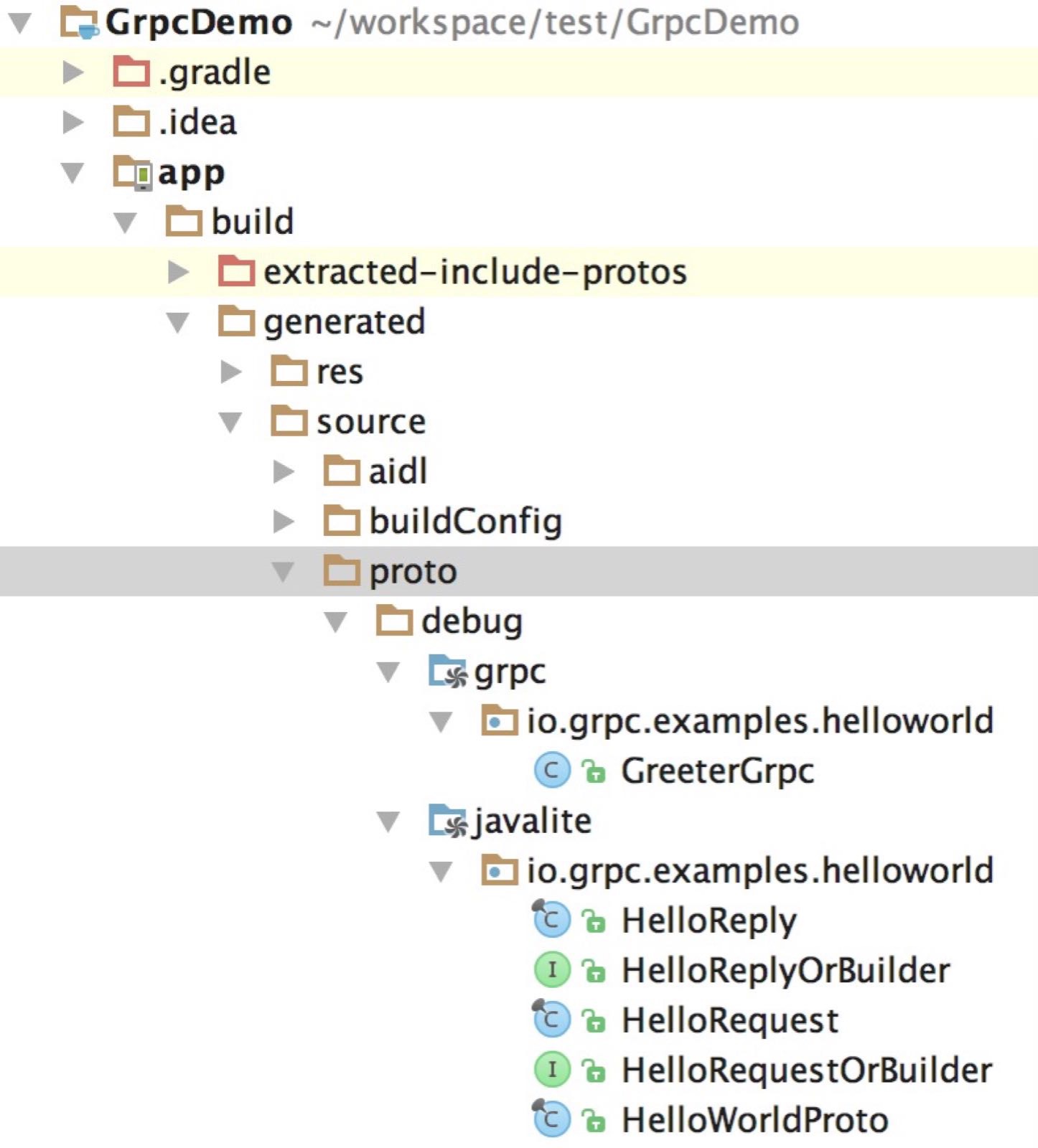
之后只需要rebuild一下就能看到build/generated/source/proto/目录下根据helloworld.proto生成了几个Java类
添加安卓端grpc的依赖 1 2 3 4 5 6 7 8 9 //App的build.gradle中添加下面配置 dependencies { ... compile 'io.grpc:grpc-okhttp:1.1.2' compile 'io.grpc:grpc-protobuf-lite:1.1.2' compile 'io.grpc:grpc-stub:1.1.2' compile 'javax.annotation:javax.annotation-api:1.2' ... }
1 2 3 configurations.all { resolutionStrategy.force 'com.google.code.findbugs:jsr305:3.0.1' }
我这个时候报了这个错误
Warning:Conflict with dependency ‘com.google.code.findbugs:jsr305’. Resolved versions for app (3.0.0) and test app (2.0.1) differ. See http://g.co/androidstudio/app-test-app-conflict for details.
这是因为com.google.code.findbugs:jsr305的版本不一致导致的
可以在App的build.gradle的android标签中配置一下解决
1 2 3 4 5 6 7 android { ... configurations.all { resolutionStrategy.force 'com.google.code.findbugs:jsr305:3.0.1' } ... }
编写demo代码 1 2 3 4 5 6 7 8 9 10 11 12 13 14 15 16 17 18 19 20 21 22 23 24 25 26 27 28 29 30 31 32 33 34 35 36 37 38 39 40 41 42 43 44 45 46 47 48 49 50 51 52 53 54 55 56 57 58 59 60 61 62 63 64 65 66 67 68 69 70 71 72 73 74 75 76 77 78 79 80 81 82 83 84 85 86 87 88 89 90 91 92 public class MainActivity extends AppCompatActivity { private static final String TAG = "GrpcDemo"; private static final int PROT = 55055; private static final String NAME = "linjw"; private static final String HOST = "localhost"; @Override protected void onCreate(Bundle savedInstanceState) { super.onCreate(savedInstanceState); setContentView(R.layout.activity_main); startServer(PROT); startClient(HOST, PROT, NAME); } private void startServer(int port){ try { Server server = ServerBuilder.forPort(port) .addService(new GreeterImpl()) .build() .start(); } catch (IOException e) { e.printStackTrace(); Log.d(TAG, e.getMessage()); } } private void startClient(String host, int port, String name){ new GrpcTask(host, port, name).execute(); } private class GreeterImpl extends GreeterGrpc.GreeterImplBase { public void sayHello(HelloRequest request, StreamObserver<HelloReply> responseObserver) { responseObserver.onNext(sayHello(request)); responseObserver.onCompleted(); } private HelloReply sayHello(HelloRequest request) { return HelloReply.newBuilder() .setMessage("hello "+ request.getName()) .build(); } } private class GrpcTask extends AsyncTask<Void, Void, String> { private String mHost; private String mName; private int mPort; private ManagedChannel mChannel; public GrpcTask(String host, int port, String name) { this.mHost = host; this.mName = name; this.mPort = port; } @Override protected void onPreExecute() { } @Override protected String doInBackground(Void... nothing) { try { mChannel = ManagedChannelBuilder.forAddress(mHost, mPort) .usePlaintext(true) .build(); GreeterGrpc.GreeterBlockingStub stub = GreeterGrpc.newBlockingStub(mChannel); HelloRequest message = HelloRequest.newBuilder().setName(mName).build(); HelloReply reply = stub.sayHello(message); return reply.getMessage(); } catch (Exception e) { StringWriter sw = new StringWriter(); PrintWriter pw = new PrintWriter(sw); e.printStackTrace(pw); pw.flush(); return "Failed... : " + System.lineSeparator() + sw; } } @Override protected void onPostExecute(String result) { try { mChannel.shutdown().awaitTermination(1, TimeUnit.SECONDS); } catch (InterruptedException e) { Thread.currentThread().interrupt(); } Log.d(TAG, result); } } }
这段代码运行会崩溃:
Caused by: io.grpc.ManagedChannelProvider$ProviderNotFoundException: No functional server found. Try adding a dependency on the grpc-netty artifact
猜测google使用netty替代了okhttp,尝试换成grpc-netty的依赖:
1 2 3 4 5 6 7 8 dependencies { ... compile 'io.grpc:grpc-netty:1.1.2' compile 'io.grpc:grpc-protobuf-lite:1.1.2' compile 'io.grpc:grpc-stub:1.1.2' compile 'javax.annotation:javax.annotation-api:1.2' ... }
这么编译会报错
com.android.build.api.transform.TransformException: com.android.builder.packaging.DuplicateFileException: Duplicate files copied in APK META-INF/INDEX.LIST
需要加上下面的配置解决
1 2 3 4 5 6 7 8 9 android { ... packagingOptions { pickFirst 'META-INF/INDEX.LIST' pickFirst 'META-INF/LICENSE' pickFirst 'META-INF/io.netty.versions.properties' } ... }
当然,还需要加上INTERNET权限,要不然运行的时候还是会崩溃。
最终就能看的下面的打印,这样安卓grpc的helloworld就成功了。
03-03 00:04:20.000 6137-6137/linjw.com.grpcdemo D/GrpcDemo: hello linjw
Any可以携带任意类型的数据,用法相当于c语言的void指针。在项目中是很常用的,但是谷歌在javalite的版本不支持Any。
如果在proto文件中使用了Any的话生成java代码就会有报错,例如将helloworld的proto文件改成下面的样子:
1 2 3 4 5 6 7 8 9 10 11 12 13 14 15 16 17 18 19 20 21 22 23 24 25 26 27 28 29 30 31 32 33 34 35 36 37 38 39 40 41 42 43 44 45 46 47 48 49 50 51 52 53 54 55 // Copyright 2015, Google Inc. // All rights reserved. // // Redistribution and use in source and binary forms, with or without // modification, are permitted provided that the following conditions are // met: // // * Redistributions of source code must retain the above copyright // notice, this list of conditions and the following disclaimer. // * Redistributions in binary form must reproduce the above // copyright notice, this list of conditions and the following disclaimer // in the documentation and/or other materials provided with the // distribution. // * Neither the name of Google Inc. nor the names of its // contributors may be used to endorse or promote products derived from // this software without specific prior written permission. // // THIS SOFTWARE IS PROVIDED BY THE COPYRIGHT HOLDERS AND CONTRIBUTORS // "AS IS" AND ANY EXPRESS OR IMPLIED WARRANTIES, INCLUDING, BUT NOT // LIMITED TO, THE IMPLIED WARRANTIES OF MERCHANTABILITY AND FITNESS FOR // A PARTICULAR PURPOSE ARE DISCLAIMED. IN NO EVENT SHALL THE COPYRIGHT // OWNER OR CONTRIBUTORS BE LIABLE FOR ANY DIRECT, INDIRECT, INCIDENTAL, // SPECIAL, EXEMPLARY, OR CONSEQUENTIAL DAMAGES (INCLUDING, BUT NOT // LIMITED TO, PROCUREMENT OF SUBSTITUTE GOODS OR SERVICES; LOSS OF USE, // DATA, OR PROFITS; OR BUSINESS INTERRUPTION) HOWEVER CAUSED AND ON ANY // THEORY OF LIABILITY, WHETHER IN CONTRACT, STRICT LIABILITY, OR TORT // (INCLUDING NEGLIGENCE OR OTHERWISE) ARISING IN ANY WAY OUT OF THE USE // OF THIS SOFTWARE, EVEN IF ADVISED OF THE POSSIBILITY OF SUCH DAMAGE. syntax = "proto3"; option java_multiple_files = true; option java_package = "io.grpc.examples.helloworld"; option java_outer_classname = "HelloWorldProto"; option objc_class_prefix = "HLW"; package helloworld; import "google/protobuf/any.proto"; // The greeting service definition. service Greeter { // Sends a greeting rpc SayHello (google.protobuf.Any) returns (HelloReply) {} } // The request message containing the user's name. message HelloRequest { string name = 1; } // The response message containing the greetings message HelloReply { string message = 1; }
报错如下
google/protobuf/any.proto: File not found.
使用grpc-jave代替grpc-javalite 但是现在做的这个项目的linux端实现已经用了Any,要改的话需要耗费比较大的精力。幸好尝试了下,发现安卓上也能跑支持Any的grpc-java。
首先我们要使用grpc-protobuf依赖替换grpc-protobuf-lite依赖
1 2 3 4 5 6 7 8 dependencies { ... compile 'io.grpc:grpc-netty:1.1.2' compile 'io.grpc:grpc-protobuf:1.1.2' compile 'io.grpc:grpc-stub:1.1.2' compile 'javax.annotation:javax.annotation-api:1.2' ... }
接着修改protobuf-gradle-plugin配置使得自动生成java的代码而不是javalite的代码
1 2 3 4 5 6 7 8 9 10 11 12 13 14 15 16 17 18 19 20 protobuf { protoc { artifact = 'com.google.protobuf:protoc:3.0.0' } plugins { grpc { artifact = 'io.grpc:protoc-gen-grpc-java:1.0.0' // CURRENT_GRPC_VERSION } } generateProtoTasks { all().each { task -> task.builtins { java {} } task.plugins { grpc {} } } } }
对应的修改helloworld的代码就能运行了
1 2 3 4 5 6 7 8 9 10 11 12 13 14 15 16 17 18 19 20 21 22 23 24 25 26 27 28 29 30 31 32 33 34 35 36 37 38 39 40 41 42 43 44 45 46 47 48 49 50 51 52 53 54 55 56 57 58 59 60 61 62 63 64 65 66 67 68 69 70 71 72 73 74 75 76 77 78 79 80 81 82 83 84 85 86 87 88 89 90 91 92 93 94 95 96 97 public class MainActivity extends AppCompatActivity { private static final String TAG = "GrpcDemo"; private static final int PROT = 55055; private static final String NAME = "linjw"; private static final String HOST = "localhost"; @Override protected void onCreate(Bundle savedInstanceState) { super.onCreate(savedInstanceState); setContentView(R.layout.activity_main); startServer(PROT); startClient(HOST, PROT, NAME); } private void startServer(int port){ try { Server server = ServerBuilder.forPort(port) .addService(new GreeterImpl()) .build() .start(); } catch (IOException e) { e.printStackTrace(); Log.d(TAG, e.getMessage()); } } private void startClient(String host, int port, String name){ new GrpcTask(host, port, name).execute(); } private class GreeterImpl extends GreeterGrpc.GreeterImplBase { public void sayHello(Any request, StreamObserver<HelloReply> responseObserver) { try { responseObserver.onNext(sayHello(request.unpack(HelloRequest.class))); responseObserver.onCompleted(); } catch (InvalidProtocolBufferException e) { e.printStackTrace(); } } private HelloReply sayHello(HelloRequest request) { return HelloReply.newBuilder() .setMessage("hello "+ request.getName()) .build(); } } private class GrpcTask extends AsyncTask<Void, Void, String> { private String mHost; private String mName; private int mPort; private ManagedChannel mChannel; public GrpcTask(String host, int port, String name) { this.mHost = host; this.mName = name; this.mPort = port; } @Override protected void onPreExecute() { } @Override protected String doInBackground(Void... nothing) { try { mChannel = ManagedChannelBuilder.forAddress(mHost, mPort) .usePlaintext(true) .build(); GreeterGrpc.GreeterBlockingStub stub = GreeterGrpc.newBlockingStub(mChannel); HelloRequest message = HelloRequest.newBuilder().setName(mName).build(); HelloReply reply = stub.sayHello(Any.pack(message)); return reply.getMessage(); } catch (Exception e) { StringWriter sw = new StringWriter(); PrintWriter pw = new PrintWriter(sw); e.printStackTrace(pw); pw.flush(); return "Failed... : " + System.lineSeparator() + sw; } } @Override protected void onPostExecute(String result) { try { mChannel.shutdown().awaitTermination(1, TimeUnit.SECONDS); } catch (InterruptedException e) { Thread.currentThread().interrupt(); } Log.d(TAG, result); } } }
完整的demo代码可以点这里 在我的github中查看
Android方法数不能超过65535的问题 最后使用grpc,方法数会超过65535,可以使用com.android.support:multidex去解决